> ## Documentation Index
> Fetch the complete documentation index at: https://help.tooli.be/llms.txt
> Use this file to discover all available pages before exploring further.

# Schnellstartanleitung

> Schritt-für-Schritt-Anleitung zum Erstellen Ihres Tooli-Kontos und Starten Ihres ersten Gesprächs. In 2 Minuten startklar.

## Was Sie brauchen

<CardGroup cols={2}>
  <Card title="1) Mitgliedschaft" icon="users">
    Aktive Mitgliedschaft bei mindestens einer der Organisationen:

    <div
      style={{
    display: "grid",
    gridTemplateColumns: "repeat(4, 1fr)",
    gap: "8px",
    marginTop: "0px",
    width: "100%",
    alignItems: "center",
  }}
    >
      <a className="partnerLogoLink" href="https://embuild.be/nl/lid-worden-0" target="_blank" rel="noopener noreferrer">
        <img className="block dark:hidden" src="https://mintcdn.com/buildwise-962a266c/bLG41RMlpLkk8B9v/assets/orgs/embuild.png?fit=max&auto=format&n=bLG41RMlpLkk8B9v&q=85&s=dcde8d8eeeedd8c36e4e767a83444a96" alt="Embuild" style={{ width: "100%", height: "48px", objectFit: "contain" }} width="1583" height="1269" data-path="assets/orgs/embuild.png" />

        <img className="hidden dark:block" src="https://mintcdn.com/buildwise-962a266c/bLG41RMlpLkk8B9v/assets/orgs/embuild_dm.png?fit=max&auto=format&n=bLG41RMlpLkk8B9v&q=85&s=bc62a4b769736d19523d12f146181ddc" alt="Embuild" style={{ width: "100%", height: "48px", objectFit: "contain" }} width="1583" height="1269" data-path="assets/orgs/embuild_dm.png" />
      </a>

      <a className="partnerLogoLink" href="https://www.bouwunie.be/nl/lidmaatschap" target="_blank" rel="noopener noreferrer">
        <img src="https://mintcdn.com/buildwise-962a266c/bLG41RMlpLkk8B9v/assets/orgs/bouwunie.png?fit=max&auto=format&n=bLG41RMlpLkk8B9v&q=85&s=9fc83a563e8f689db9f64877fefaa7fa" alt="Bouwunie" style={{ width: "100%", height: "48px", objectFit: "contain" }} width="3840" height="1989" data-path="assets/orgs/bouwunie.png" />
      </a>

      <a className="partnerLogoLink" href="https://constructiv.be" target="_blank" rel="noopener noreferrer">
        <img src="https://mintcdn.com/buildwise-962a266c/bLG41RMlpLkk8B9v/assets/orgs/constructiv.png?fit=max&auto=format&n=bLG41RMlpLkk8B9v&q=85&s=a5847720f382b64ffd2187d9b41311df" alt="Constructiv" style={{ width: "100%", height: "48px", objectFit: "contain" }} width="2500" height="1385" data-path="assets/orgs/constructiv.png" />
      </a>

      <a className="partnerLogoLink" href="https://www.buildwise.be/nl/help-center/faq/hoe-maak-ik-een-buildwise-account-aan/" target="_blank" rel="noopener noreferrer">
        <img className="block dark:hidden" src="https://mintcdn.com/buildwise-962a266c/bLG41RMlpLkk8B9v/assets/orgs/buildwise.png?fit=max&auto=format&n=bLG41RMlpLkk8B9v&q=85&s=dbcac7d926097d471b08847df3d5f5af" alt="Buildwise" style={{ width: "100%", height: "48px", objectFit: "contain" }} width="2000" height="1389" data-path="assets/orgs/buildwise.png" />

        <img className="hidden dark:block" src="https://mintcdn.com/buildwise-962a266c/bLG41RMlpLkk8B9v/assets/orgs/buildwise_dm.png?fit=max&auto=format&n=bLG41RMlpLkk8B9v&q=85&s=ff4ef2e84d8108571bf3201ff4671433" alt="Buildwise" style={{ width: "100%", height: "48px", objectFit: "contain" }} width="2000" height="1389" data-path="assets/orgs/buildwise_dm.png" />
      </a>
    </div>
  </Card>

  <Card title="2) E-Mail" icon="inbox">
    Die E-Mail-Adresse, die mit einer dieser Organisationen verknüpft ist.
  </Card>
</CardGroup>

***

<Steps>
  <Step title="Zu Tooli gehen">
    **[www.tooli.be](https://www.tooli.be/)**
  </Step>

  <Step title="Registrierung">
    Es gibt 2 Optionen, um ein Konto zu erstellen:
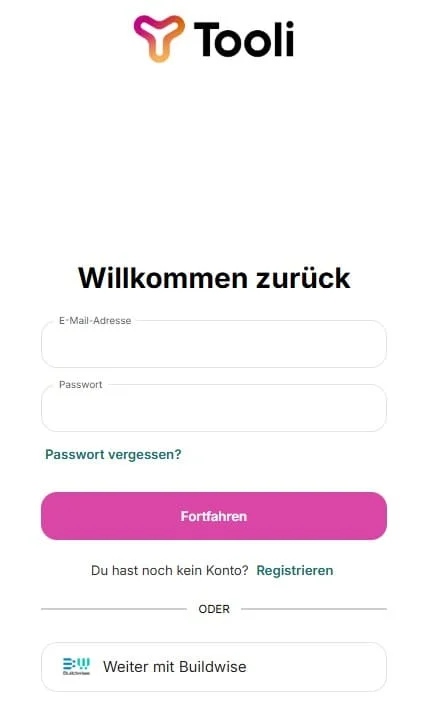
    <Frame caption="Registrieren Sie sich mit E-Mail und Passwort ('Aanmelden'), oder melden Sie sich über Buildwise an">
      <img src="https://mintcdn.com/buildwise-962a266c/bLG41RMlpLkk8B9v/assets/onboarding/de/tooli_homescreen_registration.jpg?fit=max&auto=format&n=bLG41RMlpLkk8B9v&q=85&s=65931994ed9eb8a84574b492b646f856" alt="Tooli Registrierungsbildschirm" width="422" height="722" data-path="assets/onboarding/de/tooli_homescreen_registration.jpg" />
    </Frame>

    <AccordionGroup>
      <Accordion title="1) Anmelden mit Ihrem Buildwise-Konto" icon="log-in">
        Klicken Sie auf den Buildwise-Button, um sich mit Ihrem Buildwise-Konto anzumelden.
        <Frame caption="Sie werden zu Buildwise weitergeleitet. Melden Sie sich dort an, und Ihr Konto wird automatisch mit Tooli verknüpft.">
          <img src="https://mintcdn.com/buildwise-962a266c/bLG41RMlpLkk8B9v/assets/onboarding/de/SSO_buttons.jpg?fit=max&auto=format&n=bLG41RMlpLkk8B9v&q=85&s=c4a075d7788d43529516339de3649085" alt="Anmeldung über Buildwise" width="779" height="163" data-path="assets/onboarding/de/SSO_buttons.jpg" />
        </Frame>
      </Accordion>

      <Accordion title="2) Ein Konto mit E-Mail und Passwort erstellen" icon="mail">
        **Füllen Sie Ihre Daten aus:**

        * Vollständiger Name
        * Professionelle E-Mail-Adresse

        <Tip>
          Stellen Sie sicher, dass Sie die E-Mail-Adresse verwenden, die Sie für Ihre Mitgliedschaft bei mindestens einer der Partnerorganisationen verwenden.
        </Tip>

        * Passwort (mindestens 8 Zeichen)

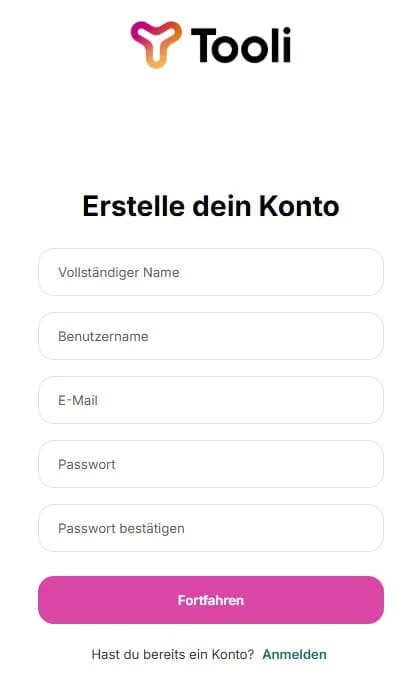
        <Frame caption="Geben Sie Ihre Daten ein und klicken Sie auf 'Aanmelden', um Ihr Konto zu erstellen.">
          <img src="https://mintcdn.com/buildwise-962a266c/bLG41RMlpLkk8B9v/assets/onboarding/de/tooli_homescreen_registration_2.jpg?fit=max&auto=format&n=bLG41RMlpLkk8B9v&q=85&s=0caefb63f9628794f361504f2d66e629" alt="Registrierungsformular" width="412" height="675" data-path="assets/onboarding/de/tooli_homescreen_registration_2.jpg" />
        </Frame>

        Sie erhalten eine Verifizierungs-E-Mail, um dies abzuschließen. Stellen Sie sicher, dass Sie Ihren Spam-Ordner überprüfen.

        <Warning>
          Keine Verifizierungs-E-Mail erhalten? Siehe [Zugang & Anmeldung](/de/support/access-and-logging-in).
        </Warning>
      </Accordion>
    </AccordionGroup>
  </Step>

  <Step title="Mit Tooli beginnen">
    Das war's!
    Die automatische Tour führt Sie durch alle Funktionen und Fähigkeiten von Tooli.

    Für weitere Fragen besuchen Sie unsere [Supportseiten](/de/support/tooli-ai-and-data).

    <Tip>
      Möchten Sie die Tour erneut sehen? Sie finden sie unten links, indem Sie auf Ihr Profil klicken und dann zu Einstellungen gehen.
    </Tip>
  </Step>
</Steps>

***

<Note>
  Nicht geschafft, oder Sie haben Fragen oder Anmerkungen? Sie können uns direkt [hier](mailto:support@tooli.be) erreichen

</Note>