> ## Documentation Index
> Fetch the complete documentation index at: https://help.tooli.be/llms.txt
> Use this file to discover all available pages before exploring further.
# Give feedback
> Tell us what went well and what could be better. Your feedback helps to improve Tooli.
Tooli gets better every day, partly thanks to your feedback. All feedback goes to the support team.
## On an answer
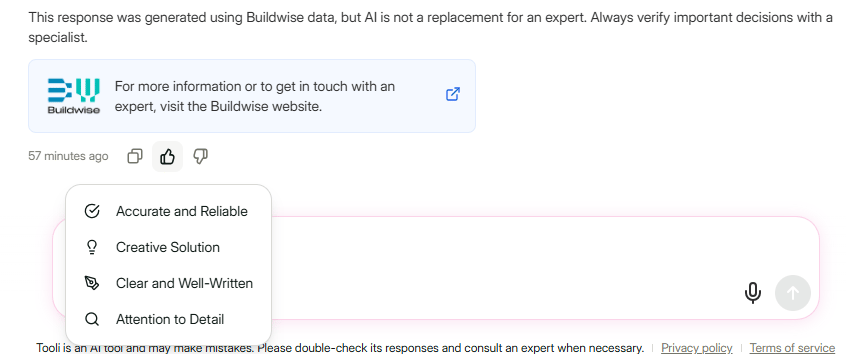
Under every Tooli answer you'll find a **thumbs up** and a **thumbs down**.
Thumbs up if the answer was good, thumbs down if it could have been better.
A list of reasons appears, such as **Accurate and Reliable** or **Creative Solution**. Choose the reason that fits best.
 Feedback on poor answers is especially valuable: that way we know exactly where Tooli still needs to improve.
## On Tooli itself
Do you have an idea, a question or a problem that doesn't belong to a single answer? Click **Provide Feedback** at the bottom right.
Stuck? Click **Help & Support**, or email us at [support@tooli.be](mailto:support@tooli.be).
This documentation is built and hosted on [Mintlify](https://mintlify.com), a developer documentation platform.
Feedback on poor answers is especially valuable: that way we know exactly where Tooli still needs to improve.
## On Tooli itself
Do you have an idea, a question or a problem that doesn't belong to a single answer? Click **Provide Feedback** at the bottom right.
Stuck? Click **Help & Support**, or email us at [support@tooli.be](mailto:support@tooli.be).
This documentation is built and hosted on [Mintlify](https://mintlify.com), a developer documentation platform.