> ## Documentation Index
> Fetch the complete documentation index at: https://help.tooli.be/llms.txt
> Use this file to discover all available pages before exploring further.
# Start a new chat
> Start a new chat with the same assistant, or choose another assistant to continue working with.
Starting a new topic? Start a new chat. You can do that in two ways.
## With the New chat button
You'll find the **New chat** button at the top left, under the Tooli logo.
 The new chat starts with the assistant you were already working with.
## With another assistant
In the **My assistants** panel on the right you see all the assistants. Click another assistant, and you immediately start a new chat with that assistant.
The new chat starts with the assistant you were already working with.
## With another assistant
In the **My assistants** panel on the right you see all the assistants. Click another assistant, and you immediately start a new chat with that assistant.
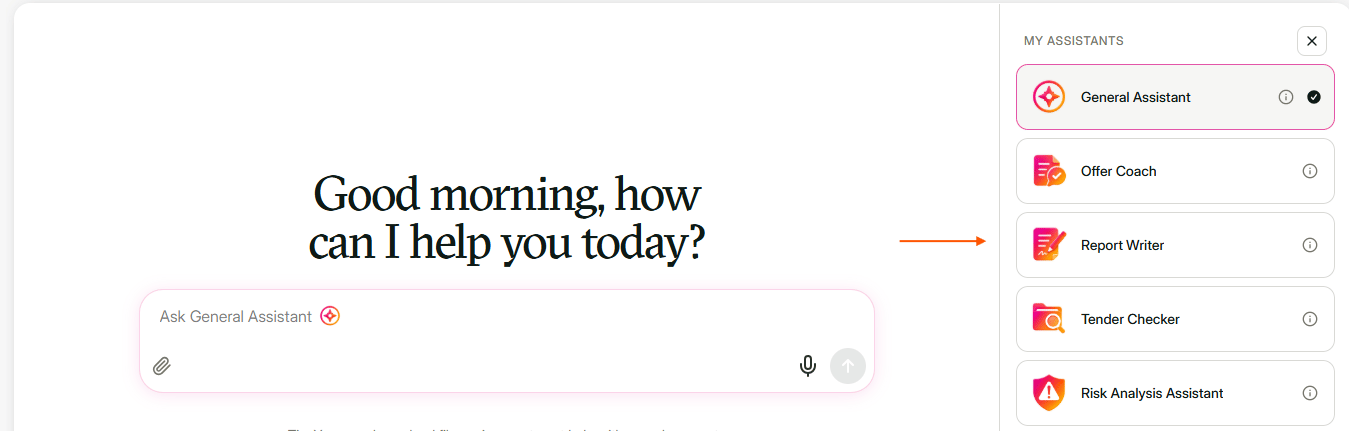 If you click the assistant you're already working with, you simply stay in your current chat. No new chat starts.
Not sure which assistant fits your question best? See [Choose an assistant](/en/support/agents-in-tooli).
Every new chat starts blank: Tooli doesn't know anything about your earlier chats. If you want to build on an earlier answer, open that chat again via [Find earlier chats](/en/using/find-previous-conversations).
This documentation is built and hosted on [Mintlify](https://mintlify.com), a developer documentation platform.
If you click the assistant you're already working with, you simply stay in your current chat. No new chat starts.
Not sure which assistant fits your question best? See [Choose an assistant](/en/support/agents-in-tooli).
Every new chat starts blank: Tooli doesn't know anything about your earlier chats. If you want to build on an earlier answer, open that chat again via [Find earlier chats](/en/using/find-previous-conversations).
This documentation is built and hosted on [Mintlify](https://mintlify.com), a developer documentation platform.