> ## Documentation Index
> Fetch the complete documentation index at: https://help.tooli.be/llms.txt
> Use this file to discover all available pages before exploring further.

# Quick start guide

> Step-by-step guide to creating your Tooli account and starting your first conversation. Get up and running in 2 minutes.

## What you need

<CardGroup cols={2}>
  <Card title="1) Membership" icon="users">
    Active membership with at least one of the organisations:

    <div
      style={{
    display: "grid",
    gridTemplateColumns: "repeat(4, 1fr)",
    gap: "8px",
    marginTop: "0px",
    width: "100%",
    alignItems: "center",
  }}
    >
      <a className="partnerLogoLink" href="https://embuild.be/nl/lid-worden-0" target="_blank" rel="noopener noreferrer">
        <img className="block dark:hidden" src="https://mintcdn.com/buildwise-962a266c/bLG41RMlpLkk8B9v/assets/orgs/embuild.png?fit=max&auto=format&n=bLG41RMlpLkk8B9v&q=85&s=dcde8d8eeeedd8c36e4e767a83444a96" alt="Embuild" style={{ width: "100%", height: "48px", objectFit: "contain" }} width="1583" height="1269" data-path="assets/orgs/embuild.png" />

        <img className="hidden dark:block" src="https://mintcdn.com/buildwise-962a266c/bLG41RMlpLkk8B9v/assets/orgs/embuild_dm.png?fit=max&auto=format&n=bLG41RMlpLkk8B9v&q=85&s=bc62a4b769736d19523d12f146181ddc" alt="Embuild" style={{ width: "100%", height: "48px", objectFit: "contain" }} width="1583" height="1269" data-path="assets/orgs/embuild_dm.png" />
      </a>

      <a className="partnerLogoLink" href="https://www.bouwunie.be/nl/lidmaatschap" target="_blank" rel="noopener noreferrer">
        <img src="https://mintcdn.com/buildwise-962a266c/bLG41RMlpLkk8B9v/assets/orgs/bouwunie.png?fit=max&auto=format&n=bLG41RMlpLkk8B9v&q=85&s=9fc83a563e8f689db9f64877fefaa7fa" alt="Bouwunie" style={{ width: "100%", height: "48px", objectFit: "contain" }} width="3840" height="1989" data-path="assets/orgs/bouwunie.png" />
      </a>

      <a className="partnerLogoLink" href="https://constructiv.be" target="_blank" rel="noopener noreferrer">
        <img src="https://mintcdn.com/buildwise-962a266c/bLG41RMlpLkk8B9v/assets/orgs/constructiv.png?fit=max&auto=format&n=bLG41RMlpLkk8B9v&q=85&s=a5847720f382b64ffd2187d9b41311df" alt="Constructiv" style={{ width: "100%", height: "48px", objectFit: "contain" }} width="2500" height="1385" data-path="assets/orgs/constructiv.png" />
      </a>

      <a className="partnerLogoLink" href="https://www.buildwise.be/nl/help-center/faq/hoe-maak-ik-een-buildwise-account-aan/" target="_blank" rel="noopener noreferrer">
        <img className="block dark:hidden" src="https://mintcdn.com/buildwise-962a266c/bLG41RMlpLkk8B9v/assets/orgs/buildwise.png?fit=max&auto=format&n=bLG41RMlpLkk8B9v&q=85&s=dbcac7d926097d471b08847df3d5f5af" alt="Buildwise" style={{ width: "100%", height: "48px", objectFit: "contain" }} width="2000" height="1389" data-path="assets/orgs/buildwise.png" />

        <img className="hidden dark:block" src="https://mintcdn.com/buildwise-962a266c/bLG41RMlpLkk8B9v/assets/orgs/buildwise_dm.png?fit=max&auto=format&n=bLG41RMlpLkk8B9v&q=85&s=ff4ef2e84d8108571bf3201ff4671433" alt="Buildwise" style={{ width: "100%", height: "48px", objectFit: "contain" }} width="2000" height="1389" data-path="assets/orgs/buildwise_dm.png" />
      </a>
    </div>
  </Card>

  <Card title="2) Email" icon="inbox">
    The email address linked to one of these organizations.
  </Card>
</CardGroup>

***

<Steps>
  <Step title="Go to Tooli">
    **[www.tooli.be](https://www.tooli.be/)**
  </Step>

  <Step title="Registration">
    There are 2 options to make an account:
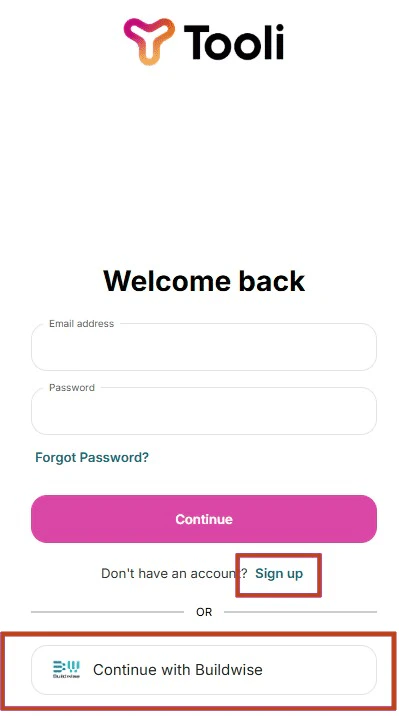
    <Frame caption="Sign up with email and password ('Aanmelden'), or log in with your Buildwise account">
      <img src="https://mintcdn.com/buildwise-962a266c/bLG41RMlpLkk8B9v/assets/onboarding/en/tooli_homescreen_registration.png?fit=max&auto=format&n=bLG41RMlpLkk8B9v&q=85&s=17a0b3491babe712e885a439fb3b0d03" alt="Tooli registration screen" width="399" height="716" data-path="assets/onboarding/en/tooli_homescreen_registration.png" />
    </Frame>

    <AccordionGroup>
      <Accordion title="1) Log in with your Buildwise account" icon="log-in">
        Click on the Buildwise button to log in with your Buildwise account.

        <Frame caption="You'll be redirected to Buildwise. Log in there, and your account is automatically linked to Tooli.">
          <img src="https://mintcdn.com/buildwise-962a266c/bLG41RMlpLkk8B9v/assets/onboarding/en/SSO_buttons.jpg?fit=max&auto=format&n=bLG41RMlpLkk8B9v&q=85&s=8b7b5abcfc7fe3ca58d3f2d59b427047" alt="Log in via Buildwise" width="663" height="125" data-path="assets/onboarding/en/SSO_buttons.jpg" />
        </Frame>
      </Accordion>

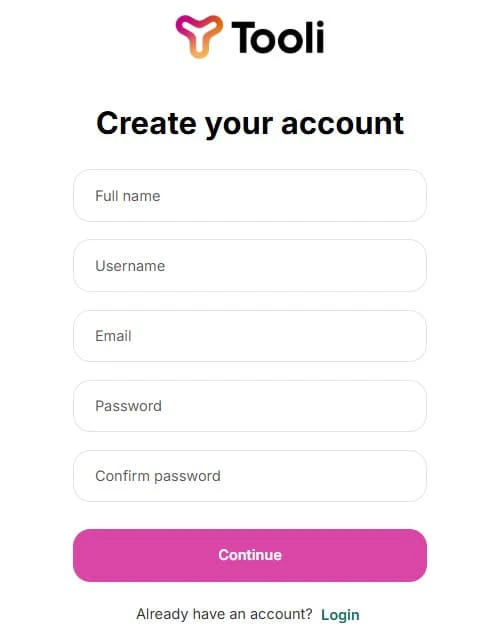
      <Accordion title="2) Create an account with email and password" icon="mail">
        **Fill in your details:**

        * Full name
        * Professional email address

        <Tip>
          Make sure you use the email address that you use for your membership with at least one of the partner organisations.
        </Tip>

        * Password (minimum 8 characters)

        <Frame caption="Fill in your details and click 'Aanmelden' to create your account.">
          <img src="https://mintcdn.com/buildwise-962a266c/bLG41RMlpLkk8B9v/assets/onboarding/en/tooli_homescreen_registration_2.jpg?fit=max&auto=format&n=bLG41RMlpLkk8B9v&q=85&s=1d4c650edbccee6d610dae65d0998758" alt="Registration form" width="494" height="633" data-path="assets/onboarding/en/tooli_homescreen_registration_2.jpg" />
        </Frame>

        You will receive a verification email to complete this. Make sure to check your spam folder.

        <Warning>
          Didn't receive the verification email? Check [Access & Logging in](/en/support/access-and-logging-in).
        </Warning>
      </Accordion>
    </AccordionGroup>
  </Step>

  <Step title="Start with Tooli">
    That's it!
    The automatic tour will guide you all of Tooli's features and skills.

    For more questions, please see our [Support pages](/en/support/tooli-ai-and-data).

    <Tip>
      Interested in seeing the tour again? You can find it in the bottom-left corner, by clicking on your profile and then going to Settings.
    </Tip>
  </Step>
</Steps>

***

<Note>
  Didn't manage, or you have questions or remarks? You can reach us directly [here](mailto:support@tooli.be)

</Note>