> ## Documentation Index
> Fetch the complete documentation index at: https://help.tooli.be/llms.txt
> Use this file to discover all available pages before exploring further.

# Guide de démarrage rapide

> Guide pas-à-pas pour créer votre compte Tooli et démarrer votre première conversation. Opérationnel en 2 minutes.

## Ce dont vous avez besoin

<CardGroup cols={2}>
  <Card title="1) Affiliation" icon="users">
    Affiliation active auprès d'au moins une des organisations :

    <div
      style={{
    display: "grid",
    gridTemplateColumns: "repeat(4, 1fr)",
    gap: "8px",
    marginTop: "0px",
    width: "100%",
    alignItems: "center",
  }}
    >
      <a className="partnerLogoLink" href="https://embuild.be/fr/devenez-membre-dembuild-0" target="_blank" rel="noopener noreferrer">
        <img className="block dark:hidden" src="https://mintcdn.com/buildwise-962a266c/bLG41RMlpLkk8B9v/assets/orgs/embuild.png?fit=max&auto=format&n=bLG41RMlpLkk8B9v&q=85&s=dcde8d8eeeedd8c36e4e767a83444a96" alt="Embuild" style={{ width: "100%", height: "48px", objectFit: "contain" }} width="1583" height="1269" data-path="assets/orgs/embuild.png" />

        <img className="hidden dark:block" src="https://mintcdn.com/buildwise-962a266c/bLG41RMlpLkk8B9v/assets/orgs/embuild_dm.png?fit=max&auto=format&n=bLG41RMlpLkk8B9v&q=85&s=bc62a4b769736d19523d12f146181ddc" alt="Embuild" style={{ width: "100%", height: "48px", objectFit: "contain" }} width="1583" height="1269" data-path="assets/orgs/embuild_dm.png" />
      </a>

      <a className="partnerLogoLink" href="https://www.bouwunie.be/nl/lidmaatschap" target="_blank" rel="noopener noreferrer">
        <img src="https://mintcdn.com/buildwise-962a266c/bLG41RMlpLkk8B9v/assets/orgs/bouwunie.png?fit=max&auto=format&n=bLG41RMlpLkk8B9v&q=85&s=9fc83a563e8f689db9f64877fefaa7fa" alt="Bouwunie" style={{ width: "100%", height: "48px", objectFit: "contain" }} width="3840" height="1989" data-path="assets/orgs/bouwunie.png" />
      </a>

      <a className="partnerLogoLink" href="https://constructiv.be" target="_blank" rel="noopener noreferrer">
        <img src="https://mintcdn.com/buildwise-962a266c/bLG41RMlpLkk8B9v/assets/orgs/constructiv.png?fit=max&auto=format&n=bLG41RMlpLkk8B9v&q=85&s=a5847720f382b64ffd2187d9b41311df" alt="Constructiv" style={{ width: "100%", height: "48px", objectFit: "contain" }} width="2500" height="1385" data-path="assets/orgs/constructiv.png" />
      </a>

      <a className="partnerLogoLink" href="https://www.buildwise.be/fr/help-center/faq/comment-puis-je-creer-un-compte-buildwise/" target="_blank" rel="noopener noreferrer">
        <img className="block dark:hidden" src="https://mintcdn.com/buildwise-962a266c/bLG41RMlpLkk8B9v/assets/orgs/buildwise.png?fit=max&auto=format&n=bLG41RMlpLkk8B9v&q=85&s=dbcac7d926097d471b08847df3d5f5af" alt="Buildwise" style={{ width: "100%", height: "48px", objectFit: "contain" }} width="2000" height="1389" data-path="assets/orgs/buildwise.png" />

        <img className="hidden dark:block" src="https://mintcdn.com/buildwise-962a266c/bLG41RMlpLkk8B9v/assets/orgs/buildwise_dm.png?fit=max&auto=format&n=bLG41RMlpLkk8B9v&q=85&s=ff4ef2e84d8108571bf3201ff4671433" alt="Buildwise" style={{ width: "100%", height: "48px", objectFit: "contain" }} width="2000" height="1389" data-path="assets/orgs/buildwise_dm.png" />
      </a>
    </div>
  </Card>

  <Card title="2) E-mail" icon="inbox">
    L'adresse e-mail liée à l'une de ces organisations.
  </Card>
</CardGroup>

***

<Steps>
  <Step title="Aller sur Tooli">
    **[www.tooli.be](https://www.tooli.be/)**
  </Step>

  <Step title="Inscription">
    Il y a 2 options pour créer un compte :
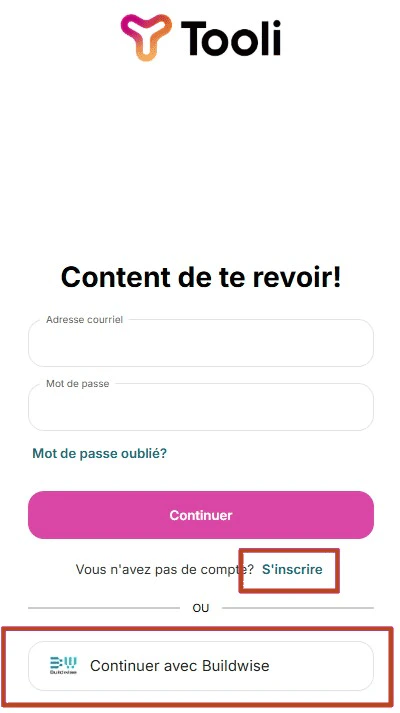
    <Frame caption="Inscrivez-vous avec e-mail et mot de passe ('Aanmelden'), ou connectez-vous via Buildwise">
      <img src="https://mintcdn.com/buildwise-962a266c/bLG41RMlpLkk8B9v/assets/onboarding/fr/tooli_homescreen_registration.png?fit=max&auto=format&n=bLG41RMlpLkk8B9v&q=85&s=f1cb674236539393e1aa33b63b293d45" alt="Écran d'inscription Tooli" width="400" height="713" data-path="assets/onboarding/fr/tooli_homescreen_registration.png" />
    </Frame>

    <AccordionGroup>
      <Accordion title="1) Se connecter avec votre compte Buildwise" icon="log-in">
        Cliquez sur le bouton Buildwise pour vous connecter avec votre compte Buildwise.

        <Frame caption="Vous serez redirigé vers Buildwise. Connectez-vous là-bas, et votre compte sera automatiquement lié à Tooli.">
          <img src="https://mintcdn.com/buildwise-962a266c/bLG41RMlpLkk8B9v/assets/onboarding/fr/SSO_buttons.jpg?fit=max&auto=format&n=bLG41RMlpLkk8B9v&q=85&s=b913b3c38900e15ee0f4144b018b12d4" alt="Connexion via Buildwise" width="670" height="120" data-path="assets/onboarding/fr/SSO_buttons.jpg" />
        </Frame>
      </Accordion>

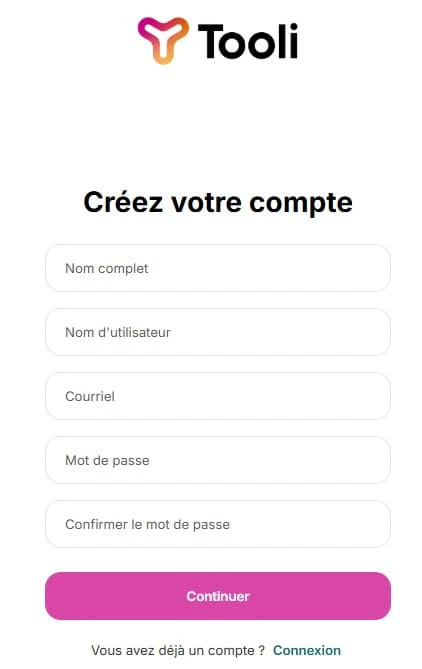
      <Accordion title="2) Créer un compte avec e-mail et mot de passe" icon="mail">
        **Remplissez vos informations :**

        * Nom complet
        * Adresse e-mail professionnelle

        <Tip>
          Assurez-vous d'utiliser l'adresse e-mail que vous utilisez pour votre affiliation auprès d'au moins une des organisations partenaires.
        </Tip>

        * Mot de passe (minimum 8 caractères)

        <Frame caption="Remplissez vos informations et cliquez sur 'Aanmelden' pour créer votre compte.">
          <img src="https://mintcdn.com/buildwise-962a266c/bLG41RMlpLkk8B9v/assets/onboarding/fr/tooli_homescreen_registration_2.jpg?fit=max&auto=format&n=bLG41RMlpLkk8B9v&q=85&s=4a6bebbad1eab5f67413681ff4ced2da" alt="Formulaire d'inscription" width="422" height="669" data-path="assets/onboarding/fr/tooli_homescreen_registration_2.jpg" />
        </Frame>

        Vous recevrez un e-mail de vérification pour compléter cela. Assurez-vous de vérifier votre dossier spam.

        <Warning>
          Vous n'avez pas reçu l'e-mail de vérification ? Consultez [Accès & Connexion](/fr/support/access-and-logging-in).
        </Warning>
      </Accordion>
    </AccordionGroup>
  </Step>

  <Step title="Commencer avec Tooli">
    C'est tout !
    La visite guidée automatique vous guidera à travers toutes les fonctionnalités et compétences de Tooli.

    Pour plus de questions, veuillez consulter nos [pages de support](/fr/support/tooli-ai-and-data).

    <Tip>
      Vous souhaitez revoir la visite guidée ? Vous la trouverez en bas à gauche, en cliquant sur votre profil puis en allant dans Paramètres.
    </Tip>
  </Step>
</Steps>

***

<Note>
  Vous n'avez pas réussi, ou vous avez des questions ou des remarques ? Vous pouvez nous contacter directement [ici](mailto:support@tooli.be)

</Note>