> ## Documentation Index
> Fetch the complete documentation index at: https://help.tooli.be/llms.txt
> Use this file to discover all available pages before exploring further.

# Aan de slag

> Stap-voor-stap handleiding om je Tooli-account aan te maken en je eerste gesprek te starten. Binnen 2 minuten aan de slag.

## Wat heb je nodig?

<CardGroup cols={2}>
  <Card title="1) Lidmaatschap" icon="users">
    Actief lidmaatschap bij ten minste één van de organisaties:

    <div
      style={{
    display: "grid",
    gridTemplateColumns: "repeat(4, 1fr)",
    gap: "8px",
    marginTop: "0px",
    width: "100%",
    alignItems: "center",
  }}
    >
      <a className="partnerLogoLink" href="https://embuild.be/nl/lid-worden-0" target="_blank" rel="noopener noreferrer">
        <img className="block dark:hidden" src="https://mintcdn.com/buildwise-962a266c/bLG41RMlpLkk8B9v/assets/orgs/embuild.png?fit=max&auto=format&n=bLG41RMlpLkk8B9v&q=85&s=dcde8d8eeeedd8c36e4e767a83444a96" alt="Embuild" style={{ width: "100%", height: "48px", objectFit: "contain" }} width="1583" height="1269" data-path="assets/orgs/embuild.png" />

        <img className="hidden dark:block" src="https://mintcdn.com/buildwise-962a266c/bLG41RMlpLkk8B9v/assets/orgs/embuild_dm.png?fit=max&auto=format&n=bLG41RMlpLkk8B9v&q=85&s=bc62a4b769736d19523d12f146181ddc" alt="Embuild" style={{ width: "100%", height: "48px", objectFit: "contain" }} width="1583" height="1269" data-path="assets/orgs/embuild_dm.png" />
      </a>

      <a className="partnerLogoLink" href="https://www.bouwunie.be/nl/lidmaatschap" target="_blank" rel="noopener noreferrer">
        <img src="https://mintcdn.com/buildwise-962a266c/bLG41RMlpLkk8B9v/assets/orgs/bouwunie.png?fit=max&auto=format&n=bLG41RMlpLkk8B9v&q=85&s=9fc83a563e8f689db9f64877fefaa7fa" alt="Bouwunie" style={{ width: "100%", height: "48px", objectFit: "contain" }} width="3840" height="1989" data-path="assets/orgs/bouwunie.png" />
      </a>

      <a className="partnerLogoLink" href="https://constructiv.be" target="_blank" rel="noopener noreferrer">
        <img src="https://mintcdn.com/buildwise-962a266c/bLG41RMlpLkk8B9v/assets/orgs/constructiv.png?fit=max&auto=format&n=bLG41RMlpLkk8B9v&q=85&s=a5847720f382b64ffd2187d9b41311df" alt="Constructiv" style={{ width: "100%", height: "48px", objectFit: "contain" }} width="2500" height="1385" data-path="assets/orgs/constructiv.png" />
      </a>

      <a className="partnerLogoLink" href="https://www.buildwise.be/nl/help-center/faq/hoe-maak-ik-een-buildwise-account-aan/" target="_blank" rel="noopener noreferrer">
        <img className="block dark:hidden" src="https://mintcdn.com/buildwise-962a266c/bLG41RMlpLkk8B9v/assets/orgs/buildwise.png?fit=max&auto=format&n=bLG41RMlpLkk8B9v&q=85&s=dbcac7d926097d471b08847df3d5f5af" alt="Buildwise" style={{ width: "100%", height: "48px", objectFit: "contain" }} width="2000" height="1389" data-path="assets/orgs/buildwise.png" />

        <img className="hidden dark:block" src="https://mintcdn.com/buildwise-962a266c/bLG41RMlpLkk8B9v/assets/orgs/buildwise_dm.png?fit=max&auto=format&n=bLG41RMlpLkk8B9v&q=85&s=ff4ef2e84d8108571bf3201ff4671433" alt="Buildwise" style={{ width: "100%", height: "48px", objectFit: "contain" }} width="2000" height="1389" data-path="assets/orgs/buildwise_dm.png" />
      </a>
    </div>
  </Card>

  <Card title="2) E-mail" icon="inbox">
    Het e-mailadres gekoppeld aan een van deze organisaties.
  </Card>
</CardGroup>

***

<Steps>
  <Step title="Ga naar Tooli">
    **[www.tooli.be](https://www.tooli.be/)**
  </Step>

  <Step title="Registratie">
    Er zijn 2 opties om een account aan te maken:
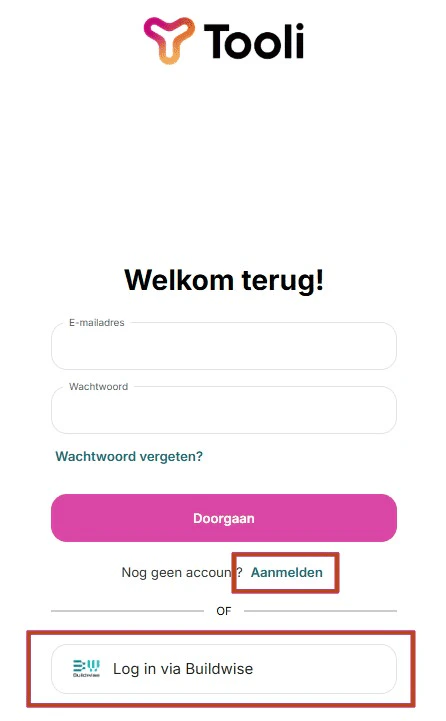
    <Frame caption="Registreer met e-mail en wachtwoord ('Aanmelden'), of log in via Buildwise">
      <img src="https://mintcdn.com/buildwise-962a266c/bLG41RMlpLkk8B9v/assets/onboarding/nl/tooli_homescreen_registration.png?fit=max&auto=format&n=bLG41RMlpLkk8B9v&q=85&s=342a85ae5a68fa2ee51b509b6d7a4f18" alt="Tooli registratiescherm" width="446" height="721" data-path="assets/onboarding/nl/tooli_homescreen_registration.png" />
    </Frame>

    <AccordionGroup>
      <Accordion title="1) Inloggen met je Buildwise-account" icon="log-in">
        Klik op de Buildwise-knop om in te loggen met je Buildwise-account.

        <Frame caption="Je wordt doorgestuurd naar Buildwise. Log daar in, en je account is automatisch gekoppeld aan Tooli.">
          <img src="https://mintcdn.com/buildwise-962a266c/bLG41RMlpLkk8B9v/assets/onboarding/nl/SSO_buttons.jpg?fit=max&auto=format&n=bLG41RMlpLkk8B9v&q=85&s=c5bde791b667cfee0305495624a617bf" alt="Inloggen via Buildwise" width="627" height="107" data-path="assets/onboarding/nl/SSO_buttons.jpg" />
        </Frame>
      </Accordion>

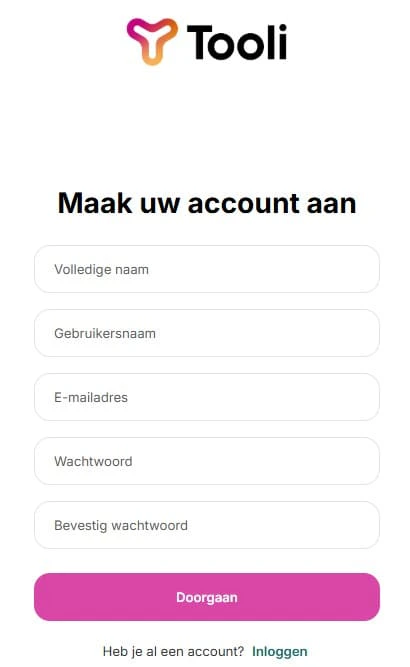
      <Accordion title="2) Maak een account aan met e-mail en wachtwoord" icon="mail">
        **Vul je gegevens in:**

        * Volledige naam
        * Professioneel e-mailadres

        <Tip>
          Zorg ervoor dat je het e-mailadres gebruikt dat je gebruikt voor je lidmaatschap bij ten minste één van de partnerorganisaties.
        </Tip>

        * Wachtwoord (minimaal 8 tekens)

        <Frame caption="Vul je gegevens in en klik op 'Aanmelden' om je account aan te maken.">
          <img src="https://mintcdn.com/buildwise-962a266c/bLG41RMlpLkk8B9v/assets/onboarding/nl/tooli_homescreen_registration_2.jpg?fit=max&auto=format&n=bLG41RMlpLkk8B9v&q=85&s=462071e6c0a4fb659ed78035ca8df433" alt="Registratieformulier" width="410" height="667" data-path="assets/onboarding/nl/tooli_homescreen_registration_2.jpg" />
        </Frame>

        Je ontvangt een verificatie-e-mail om dit te voltooien. Zorg ervoor dat je je spammap controleert.

        <Warning>
          Geen verificatie-e-mail ontvangen? Bekijk [Toegang & Inloggen](/nl/support/access-and-logging-in).
        </Warning>
      </Accordion>
    </AccordionGroup>
  </Step>

  <Step title="Start met Tooli">
    Dat is alles!
    De automatische tour begeleidt je door alle functies en vaardigheden van Tooli.

    Voor meer vragen, zie onze [Ondersteuningspagina's](/nl/support/tooli-ai-and-data).

    <Tip>
      Wil je de tour opnieuw bekijken? Je vindt deze linksonder, door op je profiel te klikken en dan naar Instellingen te gaan.
    </Tip>
  </Step>
</Steps>

***

<Note>
  Niet gelukt, of je hebt vragen of opmerkingen? Je kunt ons [hier](mailto:support@tooli.be) bereiken.

</Note>