

Your Agent Panel
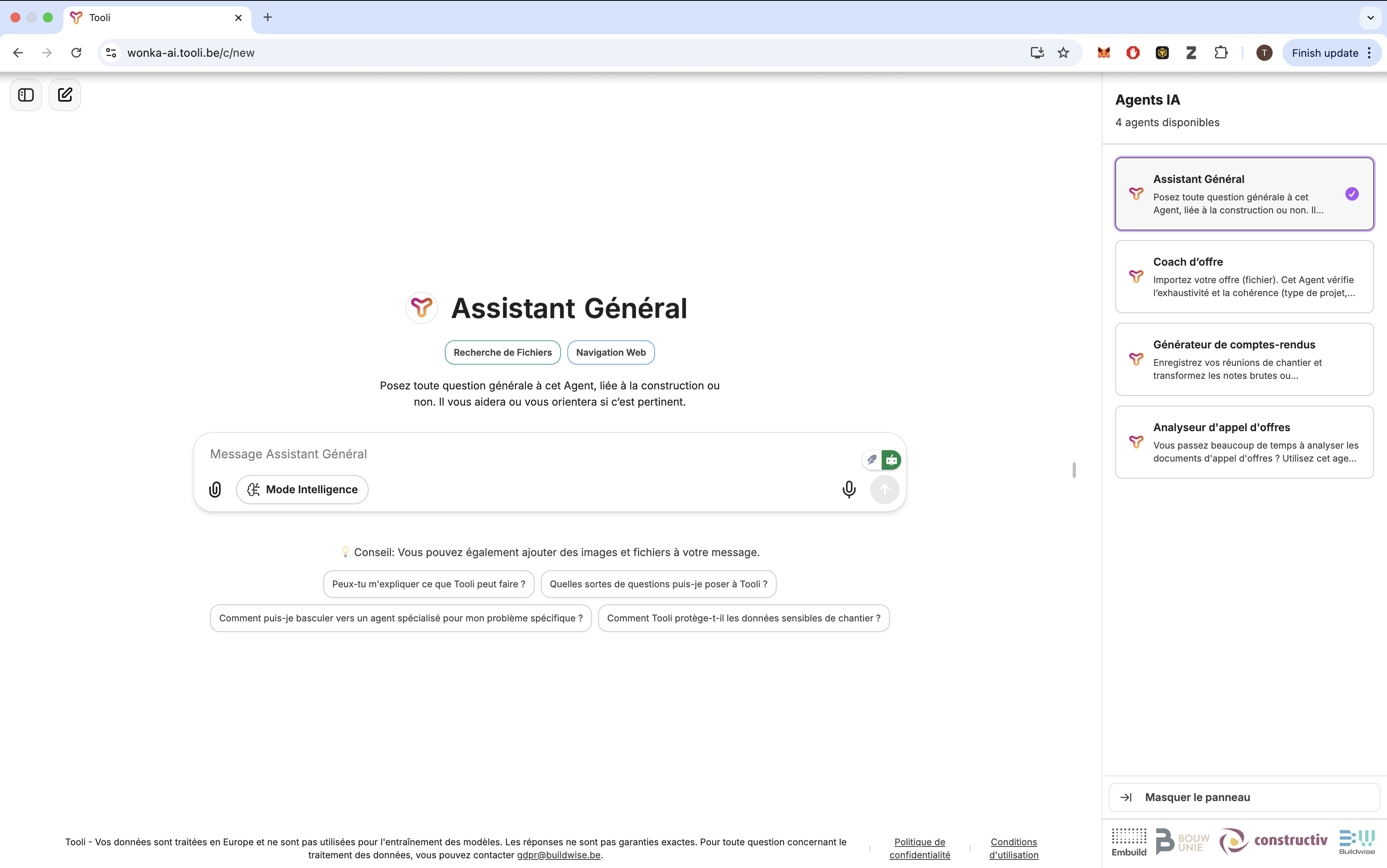
Meet Your Construction Team
General Agent
General Agent
Your first point of contact and navigation guide in Tooli
What This Agent Does
Primary Role
- Helps with all general construction questions
- Knows Belgian building codes, regulations and industry standards
- Guides you to the right specialist agent when needed
- Handles everyday questions too (not only construction)
Knowledge Areas
- Belgian construction regulations & EPB rules
- Construction materials, techniques, standards
- Site organization, safety, good practices
- General technical and non-technical topics
How to Work With This Agent
- Starting Questions
- Getting Guidance
Ask anything:
- “What is the difference between glass wool and rock wool?”
- “Explain U-value requirements in Wallonia.”
- “What causes basement condensation?”
- “Which agent should I use to analyze my quote?”
What This Agent Cannot Do
- Detailed quote analysis (use Offer Coach)
- BoQ/tender checking (use Tender Checker)
- Professional meeting minute formatting (use Meeting Minutes Writer)
- Legal advice (consult qualified professionals)
Pro Tips
- Use follow-up questions to refine answers
- Ask for sources or regulation references
- Switch to specialists when recommended
Offer Coach
Offer Coach
Your quote-quality specialist
What This Agent Does
Quote Analysis
- Analyzes your own drafted quotes
- Identifies weaknesses, ambiguities, and inconsistencies
- Checks completeness & coverage
- Highlights operational and contractual risks
Quality Areas
- Financial: margin structure, cost coverage
- Technical: clarity, completeness, conformity
- Operational: feasibility, planning assumptions
- Contractual: validity, price revision, terms
How to Work With This Agent
1
Upload Your Quote
Share your drafted offer:
- PDF, Word, Excel
- Optional: specifications, annexes, general conditions
2
Get Structured Analysis
You receive:
- Summary of quote scope
- Core analysis (financial, technical, operational, contractual)
- Top issues ranked by importance
- Opportunities to strengthen your offer
3
Iterate and Improve
Ask follow-ups:
- “Which items are unclear?”
- “Where should I add assumptions?”
- “What are the missing documents?”
4
Refine Your Quote
Make improvements, re-upload, and let Offer Coach re-check.
Example Input/Output
- What You Upload
- What You Get
A drafted quote for a renovation project.
What This Agent Cannot Do
- Create quotes from zero
- Calculate prices or give financial advice
- Draft legal clauses
- Guarantee project success
Common Mistakes to Avoid
- Assuming the agent calculates quantities
- Mixing labour & material in one line
- Forgetting to attach annexes
Pro Tips
Iterative Improvement
- Upload multiple quote versions
- Ask specific questions
- Compare approaches
Follow-up Questions
- “Where are risks insufficiently described?”
- “What assumptions should I make explicit?”
Tender Checker
Tender Checker
Your BoQ and tender document inspector
What This Agent Does
Error Detection
- Finds calculation mistakes
- Detects duplicates & missing items
- Checks units and quantities
- Flags risky or unclear descriptions
Quality Control
- Structural completeness
- Logical consistency
- Provisional quantities
- Items requiring client clarification
How to Work With This Agent
1
Upload Tender Documents
BoQ, price sheet, specifications (PDF or Excel).
2
Get Systematic Check
You receive:
- Summary of issues
- Calculation anomalies
- Missing/duplicate items
- Questions to ask the client
3
Ask Targeted Questions
- “Explain the issue in lot 3?”
- “Which items appear duplicated?”
- “What should I clarify before pricing?”
4
Prepare Clarifications
Use the findings to create precise questions for the client.
Example Analysis Output
- Input Document
- Results
BoQ for apartment renovation (230 line items).
What This Agent Cannot Do
- Interpret architectural drawings
- Calculate final prices
- Provide legal advice
- Replace a professional quantity surveyor
Working Effectively
- Ensure documents are readable
- Ask specific questions
- Verify all flagged points
- Combine with Offer Coach for pricing strategy
Meeting Minutes Writer
Meeting Minutes Writer
Your professional report builder for construction meetings
What This Agent Does
Note Transformation
- Turns raw notes into structured minutes
- Organizes discussions by theme
- Extracts decisions & deadlines
- Formats action items per person
Professional Structure
- Project header
- Executive summary
- Discussions
- Decisions
- Action items
- Open risks & questions
How to Work With This Agent
1
Prepare Your Input
Share:
- Bullets, handwritten/raw notes
- Voice transcripts
- Emails summarizing a meeting
2
Get Structured Output
You receive:
- Professional, neutral report
- Clear responsibilities
- Structured decisions & actions
3
Refine and Adjust
- “Make it more formal”
- “Create a shorter summary”
- “Reorganize action items by priority”
Example Transformation
- Your Raw Notes
- Professional Minutes
- Delay in electrical work
- New tiles must be ordered
- Client unhappy with schedule
- Safety inspection on Friday
What This Agent Cannot Do
- Attend meetings
- Add missing information
- Make project decisions
- Ensure legal compliance
Best Practices
- Provide names & roles
- Include deadlines and decisions in notes
- Give project context
- Ask for specific formatting
Working with Multiple Agents
Seamless Agent Switching
1
Start with Any Agent
Choose the agent that fits your first task.
2
Switch When Needed
Click another agent—your context automatically transfers.
3
Maintain Context
Tooli keeps your uploaded files and discussion history.
4
Combine Expertise
Use multiple agents for complete project workflows.
Example Workflows
- Complete Project Review
- Quote Development
- General Agent – “I received a tender and must prepare my quote”
- Tender Checker – Upload BoQ and specs
- Offer Coach – Improve your drafted quote
- Meeting Minutes Writer – Document client discussions
Important Reminders
AI Limitations
- Agents may make mistakes
- Always verify critical information
- Use your professional judgment
- Consult specialists for legal or technical matters
Best Results
- Provide context and clear questions
- Upload relevant files
- Ask follow-up questions
- Iterate for maximum quality
Getting Started
Ready to work with your team? Select an agent that matches your task and begin building better outcomes with Tooli.